
How Much Does a Jimdo Website Cost?
A Jimdo website costs between $0 and $45 per month depending on your plan and requirements. Jimdo's paid website plans range from $11/month (Start) to $45/month (Unlimited), while online store plans cost $18 to $45 per month. If you hire a professional designer to customize your Jimdo site, expect to add $300 to $2,000+ for design services. Here's exactly what you'll pay for a Jimdo website, including subscription costs, domain fees, and all the hidden expenses most guides don't mention.
Jimdo is a German website builder founded in 2007 that has powered over 32 million websites worldwide. The platform offers two distinct editors: Jimdo Dolphin (an AI-powered builder for beginners) and Jimdo Creator (a more advanced editor with coding capabilities). Understanding which editor and plan you need is essential to calculating your true Jimdo website cost.
Jimdo Pricing Plans Compared
Jimdo offers 12 different pricing plans split between its two editors: Jimdo Dolphin (the AI-powered builder) and Jimdo Creator (the advanced editor with coding features). Here's a complete breakdown of all Jimdo website plans and what each tier includes:
Jimdo Dolphin Website Plans
| Plan | Monthly Cost | Storage | Pages | Key Features |
| Play (Free) | $0 | 500 MB | 5 pages | Jimdo subdomain, Jimdo ads, basic features |
| Start | $11/month | 5 GB | 10 pages | Custom domain (1st year free), no ads, SEO tools |
| Grow | $18/month | 15 GB | 50 pages | All Start features plus 5 email forwards, faster support |
| Unlimited | $45/month | Unlimited | Unlimited | Design analysis, premium support (1hr), 20 email forwards |
Note: All prices shown are based on annual billing. Monthly billing costs approximately 20-30% more. Jimdo does not offer month-to-month payment on most plans.
Jimdo Dolphin Online Store Plans
| Plan | Monthly Cost | Storage | Transaction Fee | Key Features |
| Basic | $18/month | 10 GB | 0% | Unlimited products, standard payment methods |
| Business | $21-22/month | 15 GB | 0% | Product variants, discounts, social selling |
| VIP | $28-45/month | Unlimited | 0% | Priority support, design analysis, business listings |
Jimdo charges zero transaction fees on all ecommerce plans, which is a significant advantage over competitors like Shopify that charge 0.5-2% on third-party payment gateways.
Jimdo Creator Plans (Advanced Editor)
| Plan | Monthly Cost | Storage/Bandwidth | Best For |
| Free | $0 | 500 MB / 2 GB | Testing the platform, hobby projects |
| Pro | $13/month | 5 GB / 10 GB | Simple blogs, small personal projects |
| Business | $26/month | Unlimited | Small online stores, business websites |
| SEO Plus | $38/month | Unlimited | SEO-focused sites needing coaching |
| Platinum | $52/month | Unlimited | Professional sites needing RankingCoach, priority support |
Important: Jimdo Creator and Jimdo Dolphin are completely separate editors. Once you start building with one, you cannot migrate your website to the other. Choose carefully before committing to a paid plan.
Jimdo Website Design Cost
Your Jimdo website design cost depends entirely on whether you build the site yourself or hire professional help. Here's what each approach costs:
DIY Design: $0 (Included in Subscription)
Jimdo's AI-powered Dolphin editor creates a personalized website design based on your answers to a few questions. You don't choose from traditional templates-instead, the AI generates a unique design that you can customize using the drag-and-drop editor. This approach requires no coding knowledge and takes approximately 1-2 hours to complete a basic website.
Jimdo Creator offers more traditional template selection with greater customization options. You can modify colors, fonts, layouts, and even add custom CSS/HTML code. However, Jimdo's template library is smaller than competitors like Wix (800+ templates) or Squarespace.
Freelance Designer Costs
| Designer Level | Hourly Rate | Project Cost | What You Get |
| Junior/Beginner | $25-50/hour | $300-800 | Basic customization, simple layouts |
| Mid-Level | $50-75/hour | $800-2,000 | Custom design, mobile optimization, basic SEO |
| Senior/Expert | $75-150/hour | $2,000-5,000 | Complete brand design, advanced customization |
Agency Design Costs
Web design agencies typically charge $3,000 to $10,000+ for a complete Jimdo website build. Agency pricing includes project management, multiple revision rounds, strategic planning, and often ongoing support. For Jimdo specifically, agency costs are usually on the lower end since the platform has limited customization compared to WordPress or custom development.
Jimdo Website Development Cost
Unlike WordPress or custom-built websites, Jimdo requires minimal development work. The platform handles hosting, security, and technical maintenance automatically. However, some development costs may apply:
Built-in Features (No Development Needed)
Jimdo includes these features at no additional development cost: contact forms, photo galleries, social media integration, blog functionality (Creator only), basic SEO tools, SSL certificates, mobile-responsive designs, and visitor statistics.
Custom Code Options (Jimdo Creator Only)
Jimdo Creator allows custom HTML, CSS, and JavaScript injection. If you need custom functionality beyond Jimdo's built-in features, expect to pay:
| Customization Type | Typical Cost | Notes |
| Simple CSS modifications | $50-200 | Font changes, color adjustments, spacing tweaks |
| Custom form integration | $100-500 | Third-party form tools like Typeform, JotForm |
| Advanced JavaScript features | $200-1,000 | Animations, interactive elements, custom calculators |
| Third-party API integrations | $300-2,000+ | CRM connections, booking systems, payment processors |
Important limitation: Jimdo Dolphin (the AI editor) does not allow any custom code. If you need development work, you must use Jimdo Creator.
Jimdo Hosting Cost
Jimdo hosting costs $0 additional-it's included in every subscription plan, including the free tier. This is one of Jimdo's key advantages over self-hosted platforms like WordPress.org.
What's Included in Jimdo Hosting
All Jimdo plans include: web hosting on Jimdo's servers, SSL certificate for secure HTTPS connections, automatic backups (limited), 99.9% uptime guarantee, CDN for faster loading, and automatic software updates and security patches.
Hosting Limitations by Plan
| Plan | Storage | Bandwidth | Impact |
| Free/Play | 500 MB | 2 GB | Suitable for ~500-1,000 monthly visitors |
| Start/Pro | 5 GB | 10 GB | Handles ~5,000-10,000 monthly visitors |
| Grow/Business | 15 GB | 20 GB | Supports ~20,000+ monthly visitors |
| Unlimited/VIP | Unlimited | Unlimited | No restrictions on traffic or storage |
True hosting cost calculation: If you compare Jimdo's $11/month Start plan to self-hosted WordPress (hosting $5-15/month + domain $15/year + SSL $0-100/year + security plugins $50-200/year), Jimdo often provides better value for simple websites.
Jimdo Domain Cost
A custom domain with Jimdo costs $0 for the first year on paid plans, then $20/year afterward. Here's the complete breakdown of Jimdo domain pricing:
Domain Options by Plan
| Plan Type | Domain Included | Cost |
| Free Plan | yoursite.jimdosite.com | $0 (subdomain only, no custom domain) |
| Paid Plans (Year 1) | yoursite.com (or .net, .org, etc.) | $0 included |
| Paid Plans (Year 2+) | Same domain | $20/year |
| External Domain | Connect existing domain | $0 to connect (pay registrar separately) |
You can also connect an existing domain from registrars like GoDaddy, Namecheap, or Google Domains. This is often cheaper long-term, as domain registrars typically charge $10-15/year compared to Jimdo's $20/year renewal.
Jimdo App and Extension Costs
Unlike Wix or WordPress with their extensive app marketplaces, Jimdo has a very limited selection of add-ons. This can be both a benefit (fewer upsells) and a limitation (fewer features).
Built-in Features (No Extra Cost)
Jimdo includes these features at no additional charge: contact forms, image galleries, social media buttons, YouTube/Vimeo video embedding, Google Maps integration, basic analytics, and blog functionality (Creator only).
Premium Add-Ons and Integrations
| Add-On | Cost | What It Does |
| Legal Text Generator | Included in Grow Legal | GDPR-compliant privacy policy, terms & conditions |
| Business Listings | $4/month | Submit to Google, Facebook, Yelp directories |
| Google Workspace Email | $6/month/user | Professional email ([email protected]) |
| Online Booking (Calendly) | Free-$16/month | Third-party scheduling integration |
| RankingCoach (SEO) | Included in Platinum | SEO recommendations and tracking |
Typical monthly app spend for a Jimdo website: $0-10 for basic sites, $10-30 for business sites with email and listings.
Hidden Costs of Jimdo
While Jimdo is generally straightforward with pricing, several costs catch users off guard. Here are the hidden expenses to budget for:
1. Domain Renewal Fees ($20/year): Your free domain only lasts 12 months. After that, Jimdo charges $20/year to renew-more expensive than most domain registrars ($10-15/year). Many users forget this cost when calculating their annual Jimdo expenses.
2. Professional Email ($72+/year): Jimdo doesn't include professional email ([email protected]). Email forwarding is free on paid plans, but for a real inbox, you'll need Google Workspace at $6/month ($72/year) per user.
3. Automatic Plan Renewals: Jimdo automatically renews your subscription at the then-current rate. Prices may increase, and if you forget to cancel, you'll be charged for another year. Jimdo offers a 14-day withdrawal period for consumers in applicable countries.
4. Page Limits on Lower Plans: The Start plan limits you to 10 pages, Grow to 50 pages. If your site grows, you may be forced to upgrade to Unlimited ($39/month) just to add more content-a significant jump from the $11 Start plan.
5. No Digital Product Sales: Jimdo only supports physical product sales with shipping or pickup. You cannot sell digital downloads, ebooks, courses, or subscriptions. If you need digital sales later, you'll have to rebuild on another platform.
6. Platform Lock-In: Jimdo websites cannot be exported or migrated to other platforms. If you outgrow Jimdo's features, you'll need to rebuild your entire website from scratch on a new platform-potentially costing hundreds or thousands of dollars.
7. Design Refresh Timeline: Jimdo's AI-generated designs can look similar to other Jimdo sites. If you want a truly unique design later, budget $500-2,000+ for professional redesign work.
Jimdo Cost Per Month: Real Examples
Here's what real Jimdo websites actually cost per month, including all fees and extras:
Example 1: Personal Portfolio ($11/month)
| Item | Monthly Cost | Annual Cost |
| Jimdo Start plan | $11 | $132 |
| Domain (after year 1) | $1.67 | $20 |
| TOTAL (Year 1) | $11 | $132 |
| TOTAL (Year 2+) | $12.67 | $152 |
Best for: Freelancers, artists, photographers needing a simple online portfolio with up to 10 pages.
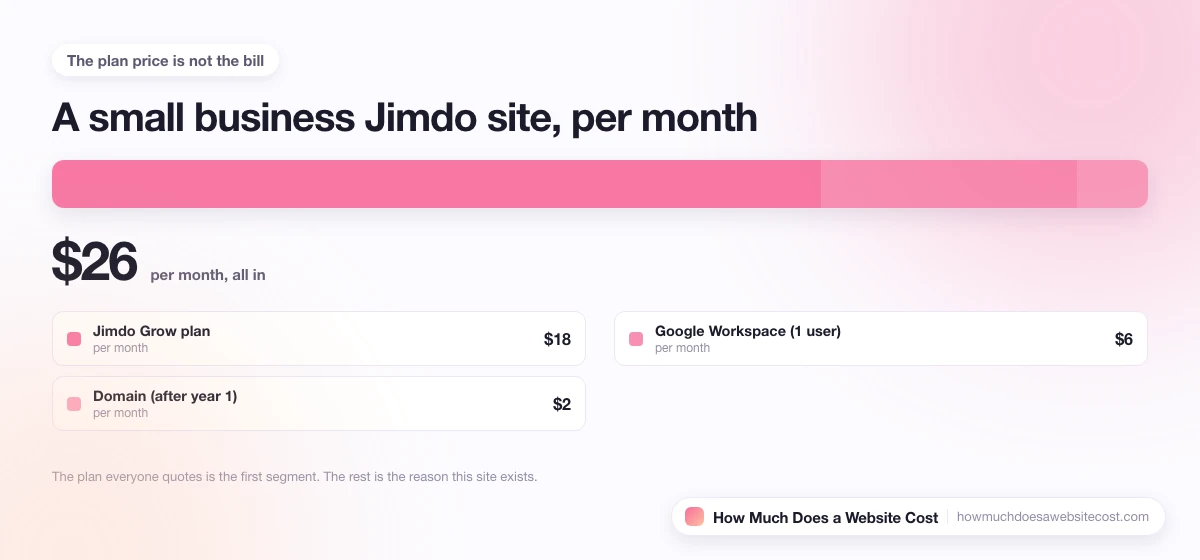
Example 2: Small Business Website ($23/month)
| Item | Monthly Cost | Annual Cost |
| Jimdo Grow plan | $18 | $216 |
| Google Workspace (1 user) | $6 | $72 |
| Domain (after year 1) | $1.67 | $20 |
| TOTAL (Year 1) | $24 | $288 |
| TOTAL (Year 2+) | $25.67 | $308 |
Best for: Local service businesses, consultants, coaches needing a professional web presence with up to 50 pages.
Example 3: Small Online Store ($33/month)
| Item | Monthly Cost | Annual Cost |
| Jimdo Business (ecommerce) plan | $22 | $264 |
| Google Workspace (1 user) | $6 | $72 |
| Business Listings add-on | $4 | $48 |
| Domain (after year 1) | $1.67 | $20 |
| TOTAL (Year 1) | $32 | $384 |
| TOTAL (Year 2+) | $33.67 | $404 |
Best for: Boutiques, artisans, small retailers selling physical products (up to ~100 items).
Example 4: Professional Site with Design Services ($1,500-3,000 first year)
| Item | Cost |
| Jimdo Unlimited plan (annual) | $540 |
| Professional design services | $1,000-2,500 |
| Google Workspace (2 users) | $144/year |
| Business Listings | $48/year |
| TOTAL (Year 1) | $1,660-3,160 |
| TOTAL (Year 2+) | $680/year ($57/month) |
Best for: Established businesses wanting a custom-designed Jimdo website with full support and features.
Jimdo vs Other Website Builders
How does Jimdo's pricing compare to major competitors? Here's a direct comparison:
| Platform | Starting Price | Free Plan | Best For |
| Jimdo | $11/month | Yes (limited) | Beginners, quick setup |
| $18/month | Yes (with ads) | Design flexibility, apps | |
| $12/month | No (14-day trial) | Creatives, portfolios | |
| $4/month | Yes (limited) | Bloggers, content sites | |
| $29/month | No (3-day trial) | Serious ecommerce | |
| $10/month | Yes (with ads) | Simple sites, beginners |
Jimdo Advantages
Zero transaction fees on all ecommerce plans (Shopify charges 0.5-2%). AI-powered design generator for quick setup. Included hosting, SSL, and security. Strong GDPR compliance and European data storage. Clean, straightforward pricing with fewer upsells.
Jimdo Disadvantages
Limited template selection compared to Wix (800+) or Squarespace. No app marketplace for extending functionality. Page limits on lower plans (10-50 pages). Cannot sell digital products. No website migration/export option. Limited SEO controls and customization. Smaller support wiki.
How to Reduce Your Jimdo Website Cost
Here are proven strategies to minimize your Jimdo expenses:
1. Start with the Free Plan to Test: Use Jimdo's free Play plan to build and test your website before committing to a paid subscription. This lets you evaluate the platform without financial risk, though you'll have Jimdo branding and a subdomain.
2. Choose Annual Billing: Jimdo's annual plans save 20-30% compared to monthly billing. For the Start plan, this could save you $30-50 per year.
3. Use an External Domain Registrar: After your free domain year expires, transfer your domain to a registrar like Namecheap ($10-12/year) or Cloudflare ($9-10/year) instead of paying Jimdo's $20/year renewal fee.
4. Skip Professional Email Initially: Use free email forwarding (included in paid plans) instead of Google Workspace. Forward [email protected] to your personal Gmail. You can always add professional email later when needed.
5. Choose the Right Plan Size: Don't overpay for unlimited features you won't use. Most small websites fit within the 10-page Start plan. Only upgrade to Grow or Unlimited when you actually need more pages or storage.
6. DIY Your Design: Jimdo's AI designer creates professional-looking sites for free. Before hiring a designer, spend a few hours customizing the AI-generated design yourself. You may find it's good enough for your needs.
Is Jimdo Worth the Cost?
Jimdo is worth the cost if you need a simple website quickly and don't require advanced features. Here's who should and shouldn't use Jimdo:
Jimdo Is Worth It If You:
Need a website online in under an hour. Want minimal technical complexity. Have a small website (under 50 pages). Sell physical products only (no digital goods). Value GDPR compliance and EU data storage. Don't need extensive customization or third-party apps. Are comfortable with limited SEO controls. Want predictable, straightforward pricing.
Consider Alternatives If You:
Need extensive design customization (try Wix or Squarespace). Want to sell digital products (try Shopify or WordPress). Need advanced SEO features (try WordPress.org). Require third-party app integrations (try Wix). Plan to scale to a large website (try WordPress). Need to migrate your site in the future (try WordPress). Want the lowest possible price (try Weebly or WordPress.com).
Bottom Line
A Jimdo website costs $132-468 per year for the subscription alone, plus $20/year for domain renewal after year one and $72+/year if you need professional email. Total first-year cost ranges from $132 for a basic portfolio to $3,000+ for a professionally designed business site. Jimdo offers good value for simple websites with its included hosting, zero transaction fees, and AI-powered setup-but its limitations make it a poor choice for growing businesses that will eventually need more features.