
How Much Does a Webflow Website Cost?
A Webflow website costs $14 to $212 per month for platform subscriptions, with professional design services adding $2,000 to $50,000+ depending on complexity. The total first-year investment ranges from $168 for a DIY basic site to $100,000+ for an agency-built enterprise solution.
Webflow subscription plans range from $14/month (Basic) to $212/month (Advanced Ecommerce), all billed annually. Professional Webflow designers charge $30 to $150 per hour, with project-based pricing from $1,000 for simple landing pages to $200,000+ for complex enterprise sites.
Here's exactly what you'll pay for a Webflow website, including platform costs, design services, add-ons, and hidden fees most guides overlook.
Webflow Pricing Plans Compared
Webflow structures its pricing into Site Plans (for hosting and publishing) and Workspace Plans (for team collaboration). Most users need a Site Plan to launch their website on a custom domain.
General Site Plans:
| Plan | Monthly (Annual) | Pages | CMS Items | Best For |
| Starter | Free | 2 | 50 | Learning & prototyping |
| Basic | $14/mo | 150 | None | Simple landing pages, portfolios |
| CMS | $23/mo | 150 | 2,000 | Blogs, content-driven sites |
| Business | $39-$1,049/mo | 300 | 10K-20K | High-traffic marketing sites |
| Enterprise | Custom | Custom | Custom | Large organizations, SLA required |
Annual billing saves 22-33% compared to monthly payments. The CMS plan at $23/month is the most popular choice for small businesses needing blog functionality or dynamic content.
Ecommerce Site Plans:
| Plan | Monthly (Annual) | Products | Transaction Fee | Best For |
| Standard | $29/mo | 500 | 2% | New stores |
| Plus | $74/mo | 5,000 | 0% | Growing businesses |
| Advanced | $212/mo | 15,000 | 0% | High-volume stores |
Webflow Website Design Cost
Webflow design costs range from $0 for DIY builds using templates to $50,000+ for custom agency designs. The platform's visual editor enables non-coders to create professional sites, but complex projects benefit from professional expertise.
DIY Design: $0-$149
- Free templates: Basic layouts included with Webflow account
- Premium templates: $49-$149 one-time purchase from Webflow Marketplace
- Webflow AI site builder: Included with subscription for generating initial designs
Freelance Designer Costs:
| Experience Level | Hourly Rate | Project Range | Typical Scope |
| Entry-Level | $30-$50/hr | $1,000-$3,000 | Template customization |
| Mid-Level | $50-$100/hr | $3,000-$10,000 | Custom designs, CMS setup |
| Senior/Expert | $100-$150+/hr | $10,000-$25,000 | Complex builds, integrations |
Agency Design Costs:
| Agency Tier | Hourly Rate | Project Range | Includes |
| Small Studio | $80-$120/hr | $8,000-$20,000 | Design + development |
| Mid-Level Agency | $120-$175/hr | $15,000-$50,000 | Strategy, design, QA |
| Top Agency | $150-$200+/hr | $50,000-$200,000+ | Full service, enterprise |
Webflow Website Development Cost
Webflow development costs $0 for basic sites using built-in features to $25,000+ for custom functionality. The platform's visual development environment reduces traditional coding needs, but complex projects may require custom code.
Built-in Features (No Additional Cost):
- Visual drag-and-drop builder with responsive design controls
- CMS with up to 10,000 items on Business plan
- Interactions and animations (no coding required)
- Form handling with unlimited submissions on paid plans
- Ecommerce functionality on ecommerce plans
Custom Development Costs:
| Development Type | Cost Range | Examples |
| Custom JavaScript | $500-$3,000 | Complex animations, calculators |
| API Integrations | $1,000-$5,000 | CRM, payment gateways, automation |
| Custom CMS Architecture | $2,000-$7,000 | Multi-reference, filtered collections |
| Webflow Cloud/Web Apps | $5,000-$25,000+ | Custom web applications |
Webflow Hosting Cost
Webflow hosting is included in all paid Site Plans at no additional cost. Unlike WordPress or custom-coded sites, you don't pay separately for hosting, SSL certificates, or CDN services.
What's Included in Webflow Hosting:
- Global CDN (Content Delivery Network) on all plans
- Free SSL certificate (automatic HTTPS)
- DDoS protection included
- Automatic backups (unlimited on all plans)
- 99.9% uptime SLA on Enterprise plans
Bandwidth Limits by Plan:
| Plan | Bandwidth | Overage Handling |
| Starter (Free) | 1 GB/month | Site paused |
| Basic | 10 GB/month | Surge protection (1 month) |
| CMS | 50 GB/month | Surge protection (1 month) |
| Business | 100 GB-2.5 TB | Configurable |
True hosting cost calculation: Webflow's all-inclusive model means your Site Plan fee IS your hosting cost. A $23/month CMS plan provides equivalent hosting value of $50-100/month on traditional platforms.
Webflow Domain Cost
Domain costs with Webflow range from $0 (using the free subdomain) to $10-50/year for a custom domain. You can purchase domains directly through Webflow or connect domains registered elsewhere.
Domain Options:
- Free subdomain: yoursite.webflow.io (Starter plan only, includes Webflow branding)
- Custom domain through Webflow: $10-50/year depending on TLD extension
- External domain connection: Use any registrar (Namecheap, GoDaddy, Google Domains) and point DNS to Webflow
- No free domain offer: Unlike some competitors, Webflow doesn't include a free domain with paid plans
Webflow App & Integration Costs
Webflow apps and integrations range from free to $50+/month. The Webflow Marketplace offers both free tools and premium apps for extended functionality.
Free Apps & Integrations:
- Finsweet Attributes: Free JavaScript library for filtering, sorting, CMS tabs
- Google Analytics: Free integration via custom code embed
- Zapier/Make: Connect to 5,000+ apps (free tiers available)
- HubSpot Forms: Native integration available
Premium Apps (Typical Monthly Costs):
| App Category | Cost Range | Examples |
| CMS Enhancement | $6-$60/mo | Finsweet Extension, Jetboost |
| Form Builders | $0-$50/mo | Typeform, Formly |
| Membership/Auth | $15-$200/mo | Memberstack, Outseta |
| Visual Development | $0-$99/mo | Wized, Components |
Typical monthly app spend: $0-$50/month for small sites, $50-$200/month for sites with advanced functionality like memberships or custom search.
Hidden Costs of Webflow
Beyond subscription fees, Webflow has several costs that catch new users off guard. Understanding these upfront prevents budget surprises.
Transaction Fees (Ecommerce Only):
The Standard ecommerce plan charges 2% transaction fees on top of Stripe/PayPal processing fees (typically 2.9% + $0.30). For a $100 sale, you'd pay $5.20 in combined fees. The Plus and Advanced plans eliminate Webflow's transaction fee.
Premium Add-ons That Accumulate:
| Add-on | Cost |
| Localization (Essential) | $9/mo per locale (up to 3) |
| Localization (Advanced) | $29/mo per locale (up to 10) |
| Analyze (Site Analytics) | $9-$89/mo based on sessions |
| Optimize (A/B Testing) | $299+/mo based on page views |
| Extra Bandwidth | Automatic plan upgrade if exceeded |
| Form File Upload Storage | $0.50/mo per GB over 10GB |
Email & Business Tools:
Webflow doesn't include email hosting. Budget $5-12/user/month for Google Workspace or Microsoft 365. Marketing email tools like Mailchimp or ConvertKit add $10-300/month depending on list size.
Design Refresh Timeline:
Most businesses redesign their website every 2-3 years. Budget for refresh costs of $2,000-$15,000+ to keep your site current with design trends and business growth.
Platform Lock-in Considerations:
While Webflow allows code export, migrating to another platform requires rebuilding. Your CMS content, interactions, and design system are tied to Webflow's ecosystem. This isn't necessarily a problem, but factor it into long-term planning.
Webflow Cost Per Month: Real Examples
Here are four realistic cost scenarios based on common use cases, showing both one-time and recurring costs.
Example 1: Personal Portfolio (DIY)
| Item | One-Time | Monthly |
| Basic Site Plan | - | $14 |
| Free template customization | $0 | - |
| Domain (external) | - | $1 |
| TOTAL | $0 | $15/mo |
First-year total: $180
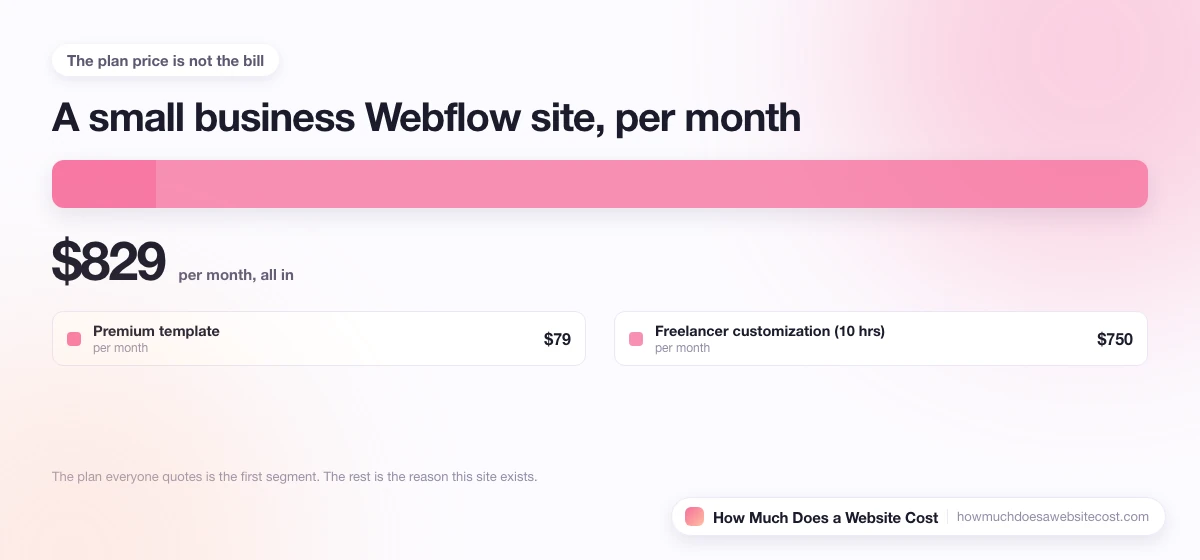
Example 2: Small Business Website
| Item | One-Time | Monthly |
| CMS Site Plan | - | $23 |
| Premium template | $79 | - |
| Freelancer customization (10 hrs) | $750 | - |
| Domain | - | $1.25 |
| Google Workspace (1 user) | - | $7 |
| TOTAL | $829 | $31.25/mo |
First-year total: $1,204
Example 3: Ecommerce Store
| Item | One-Time | Monthly |
| Plus Ecommerce Plan | - | $74 |
| Custom design (agency) | $12,000 | - |
| Domain | - | $1.25 |
| Email marketing (Klaviyo) | - | $45 |
| Apps (search, reviews) | - | $30 |
| TOTAL | $12,000 | $150.25/mo |
First-year total: $13,803
Example 4: Professional Marketing Site with Agency
| Item | One-Time | Monthly |
| Business Site Plan | - | $39 |
| Agency design & development | $35,000 | - |
| Localization (3 locales) | - | $27 |
| Analyze add-on | - | $19 |
| Maintenance retainer | - | $500 |
| TOTAL | $35,000 | $585/mo |
First-year total: $42,020
Webflow vs Other Website Builders
Webflow competes with both traditional website builders and more technical solutions. Here's how pricing and capabilities compare.
| Platform | Starting Price | Design Freedom | Ecommerce | Learning Curve | Best For |
| Webflow | $14/mo | Excellent | Good | Steep | Designers, agencies |
| $12/mo | Good | Good | Easy | Creatives, small biz | |
| $19/mo | Good | Good | Easy | Beginners | |
| $25+/mo* | Excellent | Excellent | Moderate | Bloggers, developers | |
| $29/mo | Limited | Excellent | Easy | Ecommerce stores | |
| Framer | $15/mo | Excellent | Limited | Steep | Designers |
*WordPress costs include hosting ($10-50/mo), theme ($0-200), and essential plugins ($0-100/mo).
Webflow Advantages:
- Clean, semantic code output with excellent performance scores
- Complete design freedom without writing code
- Built-in hosting with global CDN
- Visual CMS with robust content modeling
- Code export option for future flexibility
Webflow Disadvantages:
- Steeper learning curve than Wix or Squarespace
- Higher cost for advanced features and ecommerce
- Smaller app ecosystem compared to WordPress or Shopify
- No built-in email marketing or membership features (requires third-party apps)
How to Reduce Your Webflow Website Cost
Strategic choices can significantly reduce your Webflow investment without sacrificing quality.
1. Start with an Annual Plan
Annual billing saves 22-33% compared to monthly. The CMS plan drops from $29/month to $23/month-saving $72/year.
2. Choose the Right Plan (Don't Overbuy)
Most small businesses need only the CMS plan ($23/mo). Only upgrade to Business if you genuinely need 10,000+ CMS items or 100GB+ bandwidth.
3. Use Premium Templates Instead of Custom Design
A $79-$149 premium template with light customization ($500-$1,500) delivers 80% of custom design quality at 20% of the cost.
4. Learn Webflow Yourself
Webflow University offers free comprehensive training. Investing 20-40 hours in learning can save thousands on future updates and changes.
5. Use Free Tools First
Free solutions like Finsweet Attributes, native Webflow interactions, and embedded Google Analytics handle most needs. Add premium apps only when you've outgrown free options.
6. Hire Based on Location
Quality Webflow developers in Eastern Europe or Latin America charge $50-$95/hour compared to $100-$200/hour for US-based agencies with comparable skill levels.
Is Webflow Worth the Cost?
Webflow delivers exceptional value for the right use cases but isn't the optimal choice for everyone.
Webflow is worth it if you:
- Need complete design control without coding
- Prioritize site performance and clean code output
- Want to avoid WordPress maintenance headaches
- Are building a marketing site, portfolio, or content-driven website
- Value predictable, all-inclusive hosting costs
- Are a designer or agency building client websites
Consider alternatives if you:
- Want the simplest possible setup (choose Squarespace or Wix)
- Need advanced ecommerce with complex inventory (choose Shopify)
- Require extensive plugins and third-party integrations (choose WordPress)
- Have an extremely tight budget under $15/month (choose Wix or Squarespace)
- Need complex web applications beyond content sites (consider custom development)